
24 Sept 2026Using AI Well
Feeling faster with AI is not the same as being faster
Controlled studies show real AI gains on the right tasks and real losses on the wrong ones. The skill is knowing which is which, and measuring it.
Author: Team Thinqmesh · 5 min read
- ChatGPT
- Claude
- GitHub Copilot
- Notion
- Google Sheets
In one study, experienced developers took 19% longer to finish their work with AI, while believing afterwards that it had made them 20% faster (METR, 2025). In another, consultants using AI were 25.1% faster and produced 40% higher-quality work (HBS AI Institute). Both can be true. AI helps a lot on some tasks, hurts on others, and our own sense of which is which is not reliable. This post walks through the evidence and what good practice looks like.
The gains are real
Start with the good news. Several controlled studies, where one group works with AI and another without, found large gains.
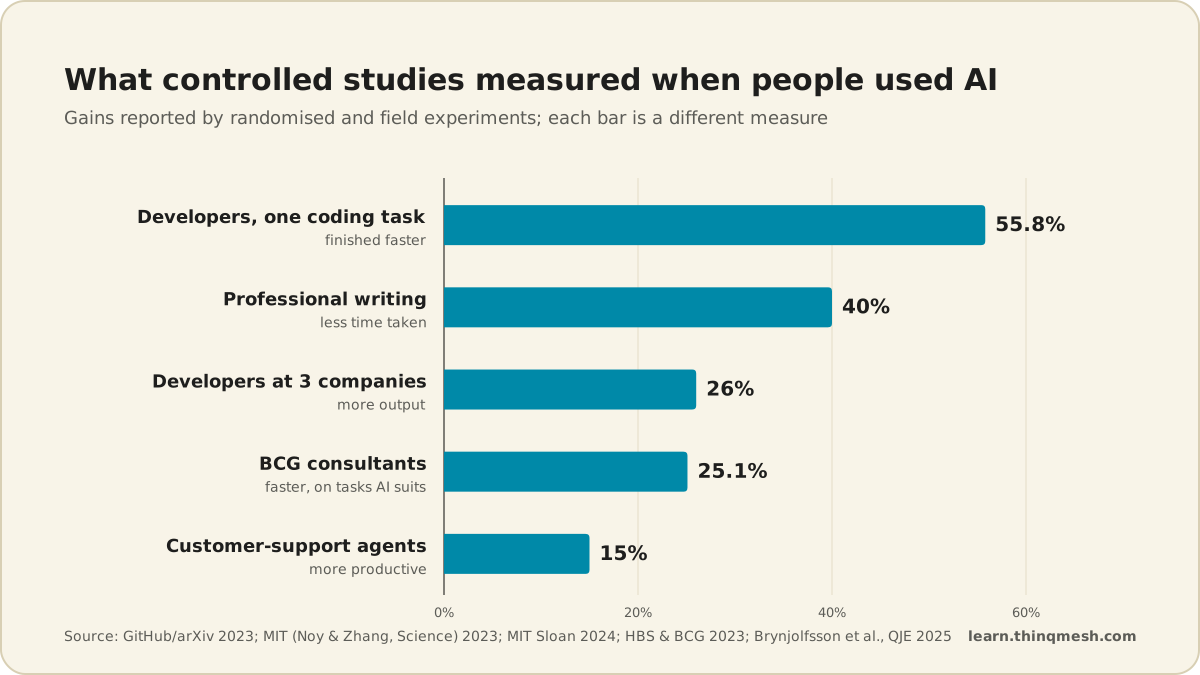
- On one coding task, building a web server, developers with an AI pair programmer were 55.8% faster (arXiv, 2023).
- Developers at Microsoft, Accenture and a Fortune 100 firm increased output by 26% (MIT Sloan, 2024).
- 5,172 customer support agents became 15% more productive on average (Brynjolfsson, Li & Raymond, 2025).
- At P&G, 776 professionals took part in a study where individuals working with AI matched teams working without it (NBER, 2025).
Notice how narrow each measurement is. One coding task. One support queue. These are not promises that every job gets 26% faster.
The jagged frontier
The most useful single study is the one BCG ran with Harvard Business School and 758 of its consultants. Researchers called the edge of what AI does well a "jagged frontier": some tasks that look hard fall inside it, some that look easy fall outside it (HBS AI Institute).
Inside the frontier, consultants with AI completed 12.2% more tasks, 25.1% faster, at 40% higher quality. Lower performers gained the most, 43%.
Outside the frontier, the picture flipped. On a task designed for AI to get wrong, consultants without AI were right 84% of the time. With AI, they were right only 60–70% of the time (Mollick). The AI gave a confident, plausible answer, and people accepted it.
BCG's own write-up adds another warning: while quality improved on creative product innovation by about 40%, it was 23% worse on business problem-solving, and the diversity of ideas across the group was 41% lower (BCG, 2023). Everyone using the same tool the same way tends to converge on the same answer.
Why you cannot trust the feeling
Back to the developers. METR's 2025 study followed 16 experienced open-source developers. Before starting, they expected AI to make them 24% faster. They actually took 19% longer. Afterwards, they still believed they had been 20% faster (METR, 2025).
That study has a follow-up. In 2026, METR's updated work now estimates a speed-up, but METR itself calls that weak evidence (METR, 2026). Read together, the two studies say something simple: the effect depends on the people, the tools and the task, and the feeling of speed is not a measurement.
There is a related finding on thinking. A Microsoft Research and Carnegie Mellon survey of 319 knowledge workers found that higher confidence in generative AI was associated with less critical thinking (Microsoft Research & CMU, 2025). The more we trust the tool, the less we tend to check it.
Juniors and seniors gain differently
Experience changes the picture too.
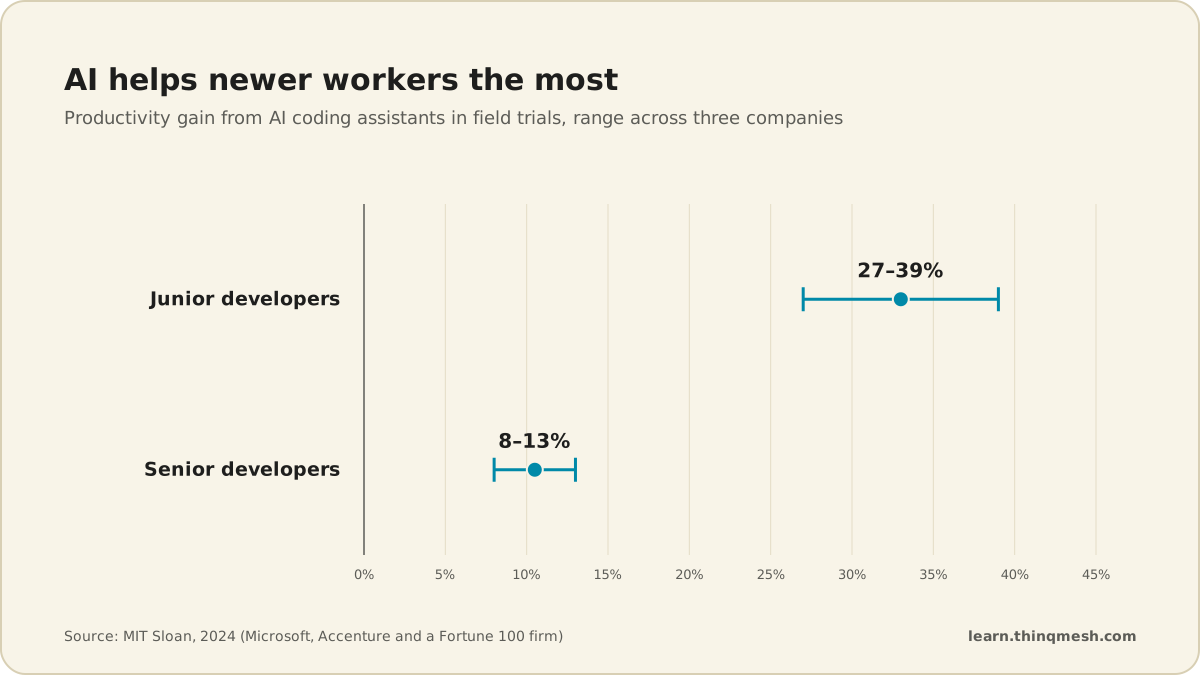
Junior developers gained 27–39%; seniors gained 8–13% (MIT Sloan, 2024). In the support study, the biggest gains went to less-experienced agents, while top performers saw small speed gains and slight quality declines (Brynjolfsson, Li & Raymond, 2025).
That sounds like good news for beginners, and it is, with one catch. A randomised trial on learning a coding skill found the group using AI scored 50% on a follow-up quiz, against 67% for the group without it. Participants who asked the AI for explanations, rather than just answers, kept learning (Anthropic, 2026). If you are early in your career, how you use AI decides whether it makes you better or only faster today.
Individual speed is not team results
One more gap. In Denmark, researchers found workers reported productivity benefits from AI but null effects on their earnings and hours (NBER, Humlum & Vestergaard). Ethan Mollick puts it plainly: "AI use that boosts individual performance does not naturally translate to improving organizational performance" (Mollick, 2025).
Saving twenty minutes on a draft only matters if the time goes somewhere useful, and if the draft does not cost a colleague an hour to fix.
What good practice looks like
Across these studies, the people who gained were not the ones who used AI the most. They were the ones who used it on the right tasks and kept their judgement switched on. In practice that means three habits.
You + an AI assistant
1.Pick the right task
Hand over work that sits inside the frontier.
2.Check every output
Read it as if a new intern wrote it.
3.Measure, do not guess
Time the task with and without AI.
4.Adjust what you hand over
Use what you measured to sort your tasks.
…then back to step 1
1.Pick the right task
Hand over work that sits inside the frontier.
2.Check every output
Read it as if a new intern wrote it.
You + an AI assistant
4.Adjust what you hand over
Use what you measured to sort your tasks.
3.Measure, do not guess
Time the task with and without AI.
Know which tasks to hand over. First drafts, summaries of material you have read, reformatting, brainstorming options, explaining unfamiliar code: often inside the frontier. Final numbers, legal or medical judgement, anything where a plausible wrong answer is costly: treat with care.
Check, every time. Read the output as if a new intern wrote it. Verify facts and figures against the source. Ask the AI to explain its reasoning, and notice when the explanation does not hold up.
Measure, do not guess. As an illustration, an accountant could time the same monthly reconciliation for two cycles with AI and two without, and count the corrections needed each time. That small experiment tells you more than any feeling.
What to do next
- Map your tasks. List ten things you do every week and mark each as "inside", "outside" or "not sure" for AI.
- Run one timed test this month on a "not sure" task, with and without AI, and count the fixes needed.
- Ask for explanations, not just answers, whenever you are learning something new.
- Add a checking step to every AI-assisted piece of work before it leaves your hands.
- Share what you find with your team, including where AI made things worse.
AI Fluency spends its first month on exactly this: which problems are worth handing to a machine, and how to check the result. It is taught live, in small cohorts. See the programme.