
5 Sept 2026AI by Role
Three in four finance teams use AI. Is your spreadsheet enough?
Active AI use in finance jumped from 30% to 75% in two years. Here is what that means for accountants and analysts, and the skills worth building now.
Author: Team Thinqmesh · 5 min read
- XExcel
- Google Sheets
- QuickBooks
- Xero
- BIPower BI
- TTableau
- ChatGPT
- Claude
Active AI use in finance went from 30% of organisations in 2024 to 75% in 2026, according to a KPMG survey (KPMG, 2026). That is not a pilot any more. It is the normal way many finance teams now close the books, forecast and answer questions from the business.
If you are an accountant, an analyst or a finance manager, your spreadsheet skill still matters. But it is no longer the whole job.
The numbers for finance
The KPMG study found that 71% of finance functions using AI say it meets or exceeds their return-on-investment expectations, and 64% report stronger forecast accuracy (KPMG, 2026). It also found that 38% are focusing on upskilling their teams, and only 42% are fully "assurance-ready", meaning ready to stand behind AI-assisted numbers when an auditor asks.
Gartner puts adoption among finance leaders at 59% (Gartner, Nov 2025). The most common uses are knowledge management (49%), accounts payable automation (37%) and error and anomaly detection (34%). A separate Gartner survey found that 45% of CFOs say their AI investment leans towards productivity, while 20% say it leans towards better decisions (Gartner, Jul 2026).
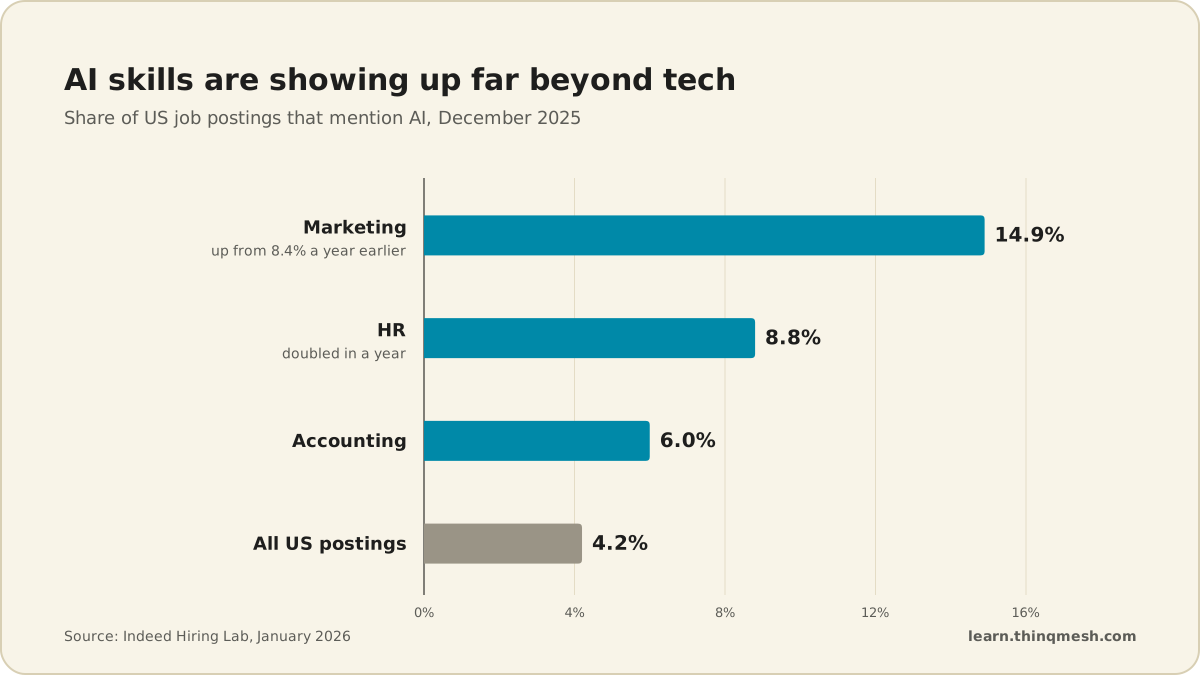
Hiring is starting to reflect this. In the US, 6% of accounting job postings mentioned AI in December 2025, well above the 4.2% for all postings (Indeed Hiring Lab, 2026).
The World Economic Forum lists data entry clerks among the fastest-declining roles to 2030, and fintech engineers among the fastest-growing (WEF, 2025). The routine end of finance work is shrinking. The judgement end is not.
What a day with AI can look like
These are illustrations of how finance people use AI assistants, not survey results.
- Month-end close. An accounts executive asks an assistant to compare this month's vendor ledger with last month's and list unusual entries. She still checks every flagged line against the invoice.
- Variance commentary. An FP&A analyst pastes a summary table (no client names) and asks for a first draft of the variance notes for the management pack. He rewrites the reasons in his own words, because only he knows why marketing spend moved.
- Policy questions. A finance manager uses an internal knowledge assistant to find what the travel policy says about international per diems, instead of searching a shared drive.
- Forecast scenarios. A controller asks for three scenarios if input costs rise, then checks the formulas herself before anything goes to the CFO.
Notice the pattern. The assistant drafts, sorts and flags. A person verifies, decides and signs.
1.Remove confidential data
No client names, PAN or bank details.
2.Assistant drafts and flags
Unusual entries, variance notes, scenarios.
3.Verify like an auditor
Recompute totals and trace figures to source.
4.You decide and sign
Accountable for the numbers, whoever drafted them.
Skills to build
Describe the task precisely. Good results come from telling the tool what the data is, what the output should look like and what "unusual" means for your business. Vague requests give vague answers.
Check output like an auditor. Recompute totals. Trace one number back to source. Ask the tool where a figure came from, and do not accept an answer you cannot verify. A KPMG and University of Melbourne study found 66% of employees rely on AI output without evaluating it, and 56% have made mistakes at work because of AI (KPMG & University of Melbourne, 2025).
Know what not to paste. Client names, PAN numbers, bank details and unpublished results do not go into a public AI tool. Use the tools your organisation has approved.
Automate the repeat work. If you reconcile the same two reports every week, that is a candidate for a small workflow rather than a new prompt each time.
Try this week
Take one recurring report you prepare. Remove anything confidential, give an AI assistant the table and ask it to list the three biggest changes and possible reasons. Then check each claim against your own numbers and write down how many were right, partly right or wrong. That tally tells you where the tool helps and where it cannot yet be trusted.
What stays human, and the risks
Finance runs on trust, and trust is personal. When Deloitte Australia delivered a government report containing a fabricated court quote and references to papers that did not exist, it refunded more than A$97,000 of a A$440,000 fee (CFO Dive, 2025). The tool made the error. The firm paid for it.
Three things stay with you:
- Sign-off. You are accountable for the numbers, whoever drafted them.
- Judgement on context. Why a customer paid late, or whether a provision is prudent, depends on things no spreadsheet holds.
- Assurance. KPMG's point about assurance readiness is really a point about people: someone must be able to explain how a number was produced.
There is also a quieter risk. Workers who feel confident in AI tend to think less critically about its output, according to research from Microsoft and Carnegie Mellon (Microsoft Research & CMU, 2025). In finance, that is exactly the habit you cannot afford to lose.
What to do next
- List the five tasks you repeat every month and mark which ones are drafting, sorting or checking.
- Find out which AI tools your organisation has approved, and what data is allowed in them.
- Run the "try this week" exercise on one report and keep your tally.
- Pick one repeat task and write down, step by step, how you would hand it to a small automated workflow.
- Talk to your manager about where AI-assisted numbers need a second check before they leave the team.
If you want to learn this properly with others, AI Fluency is taught live in small cohorts, and each month ends with a project you keep. See the programme.